
-
Age of Empires IV Hacks and Cheats – See More, Plan Better, Control the Battlefield
You can win the first fight in Age of Empires IV and still lose the match ten minutes later because your opponent quietly built a stronger economy behind it.

That is what makes AoE4 different from most games. Having the bigger army right now does not always mean much. You need to know where the enemy is expanding, what resources they are collecting, how many units they are producing and whether that suspiciously quiet corner of the map is hiding three military buildings.
Our Age of Empires IV hacks focus heavily on that information side of the game. Radar, Fog Removal, resource overlays, population tracking and camera tools give you a much clearer idea of what is happening before you send villagers, armies or resources in the wrong direction.
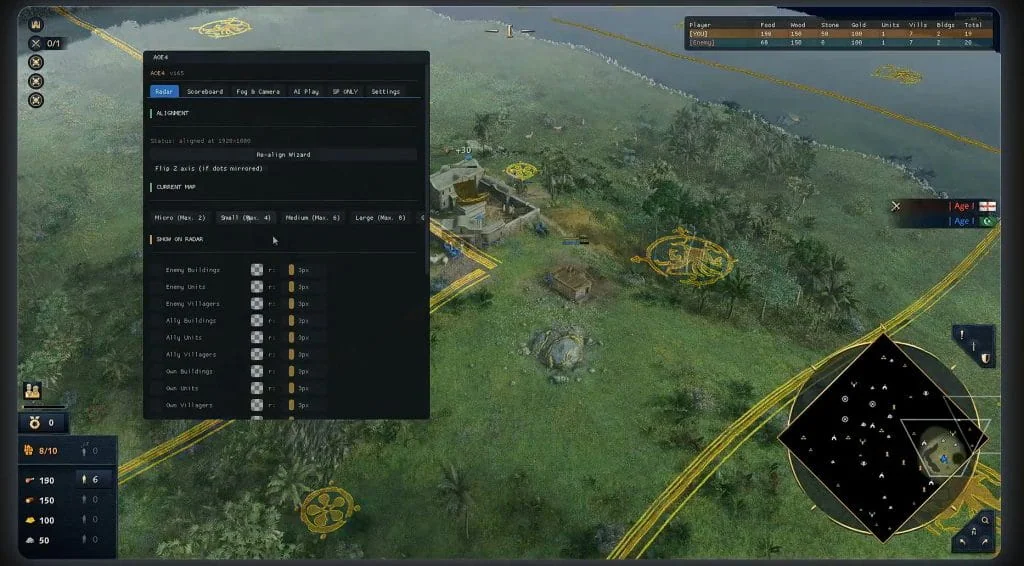
See the Whole Map with Age of Empires IV Radar
Scouting sounds simple until you are trying to manage villagers, production buildings, upgrades and an army at the same time.
That is where the radar becomes useful.
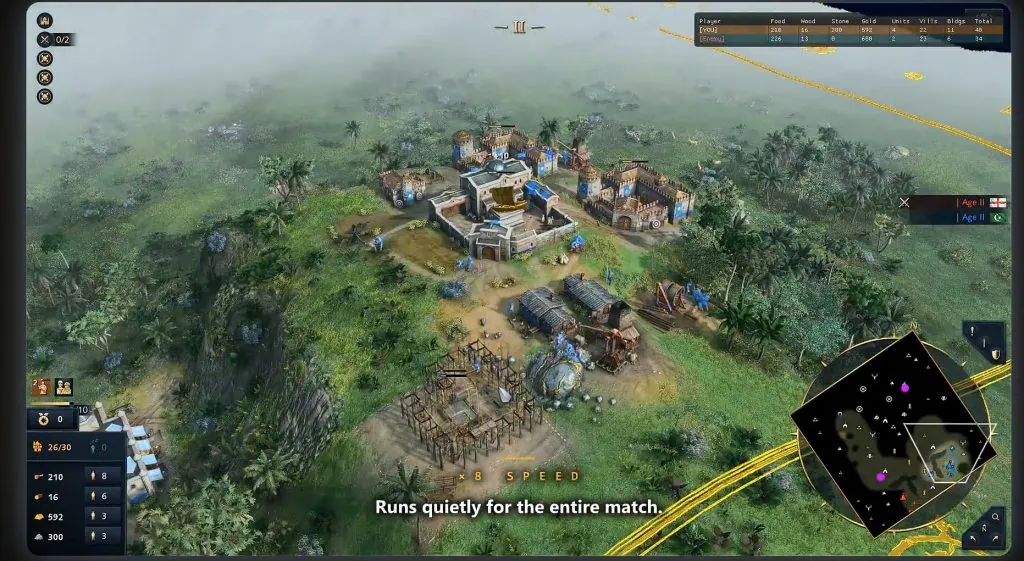
It can display enemy buildings, units and villagers, while also keeping track of allied and your own positions. The radar is aligned with the in-game minimap, so you can quickly see where things are moving without dragging the camera around every few seconds.
Resources and wildlife can be filtered too, including trees, sheep, deer, wild animals, berries, fish, gold and stone.
That becomes especially handy early in a match. Finding another gold deposit or a good food source can change where you expand next, and sometimes getting there first matters more than winning a small fight somewhere else.
The display is customizable as well. You can change minimap dot radius and colors for individual filters, create custom radar profiles and save or load different setups depending on how much information you actually want on the screen.
Sometimes less really is better. You probably do not need every sheep on the map screaming for attention while an enemy army is walking toward your base.
Remove Fog of War and Stop Guessing
Fog of war is where a lot of bad decisions begin.
You scout an area, move away for a few minutes and suddenly you have no idea whether your opponent is still there, expanding somewhere else or preparing a push just outside your vision.
Reveal Fog removes that uncertainty by opening up areas that would normally be hidden.
That means you can spend less time wondering what happened after your scout left and more time reacting to what is actually happening on the map.
It is particularly useful when an opponent looks quiet.
Quiet can mean they are doing nothing.
It can also mean they are booming, adding production buildings or getting ready to send something unpleasant in your direction.
Knowing the difference helps.
Know What the Economy Looks Like Before the Army Arrives
AoE4 matches are often decided by the economy long before the final army shows up.
Food keeps villagers and military units coming. Wood pays for buildings and production. Gold opens up technologies and stronger units, while stone can become important for defensive positions and other parts of your build.
The Player Resource Overlay lets you keep an eye on those numbers directly.
You can see live Food, Wood, Gold and Stone, along with the Population Counter and Unit Count Display.
That tells you more than simply looking at the army in front of you.
A player with a small force but a huge economy may already have another wave on the way.
On the other hand, if their resources and unit count are starting to fall behind, the fight happening right now might be more important than it first appears.
This is where the cheat fits AoE4 particularly well. You are not only seeing where things are. You are getting a better idea of what your opponent may actually be capable of doing next.
Radar Filters for Resources, Wildlife and Expansion
One of the better parts of the radar is that you do not have to leave everything enabled.
Looking for another gold vein? Show gold.
Trying to find more food? Sheep, deer, berries and fish can be separated from the rest of the map clutter.
There is also a dedicated Deer, Boar and Wolf radar, while overlay position and scale can be adjusted so the information sits where you want it instead of covering something important.
Custom filters become more useful as the match gets busier.
Early on, you might care about sheep and nearby resources. Later, those things may matter a lot less than keeping track of enemy units, villagers and buildings.
You can change the setup instead of staring at the same overloaded minimap for the entire match.
Use the Camera to Read the Battlefield Faster
Age of Empires IV can get messy once production is running, villagers are spread between several resources and more than one fight is happening at the same time.
Free Camera and Perfect Zoom Out give you more room to look around without constantly jumping between tiny sections of the battlefield.
That is useful when your army is moving out but you still need to keep an eye on your base, a second resource location or an opponent expanding somewhere else.
It sounds like a small feature until three things start happening at once.
Then being able to pull back and actually see what is going on becomes a lot more useful.
Check Compatibility Before Starting a Match
Age of Empires IV continues to receive updates, and game patches can sometimes affect cheat compatibility.
Check the current LaviCheats status before launching after a major update. If the product is being updated, wait for the latest compatible build rather than trying to run an older version.
Get Age of Empires IV Hacks
AoE4 gives you plenty to manage already.
Villagers need work. Resources need protecting. Armies need positioning. Somewhere on the other side of the map, your opponent is trying to do exactly the same thing.
The difference is how much of it you can see.
With radar, Fog Removal, resource tracking and expanded camera controls, you can spend less time guessing and more time deciding what you actually want to do next.
-
Featured Products
-

Age of Empires IV Blade
Undetected
-